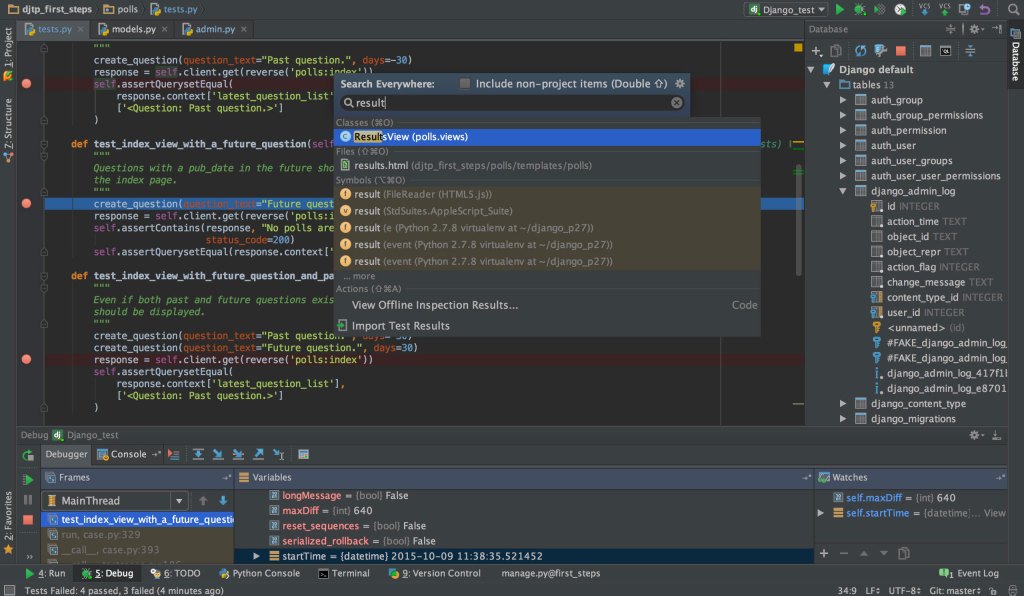
Choosing the right Integrated Development Environment (IDE) for Python can be overwhelming, given the multitude of options available. An IDE can significantly enhance your coding experience by offering features like debugging, code completion, and project management. Let’s dive into some of the most popular Python IDEs and explore their features, pros and cons, and best use cases to help you decide which one suits your needs best.
Popular Python IDEs
There are several Python IDEs that are widely used by developers. We’ll take a closer look at the top contenders: PyCharm, Visual Studio Code (VS Code), Spyder, Jupyter Notebook, IDLE, Thonny, Atom, and Wing.
PyCharm
Features of PyCharm
PyCharm, developed by JetBrains, is a feature-rich IDE specifically designed for Python. It offers intelligent code assistance, code inspections, on-the-fly error highlighting, and quick-fixes. PyCharm supports web development frameworks like Django and Flask and integrates with various version control systems.
Pros and Cons
Pros:
- Excellent code completion and debugging capabilities.
- Strong support for web frameworks.
- Integrated tools for scientific computing.
Cons:
- Can be resource-intensive.
- The professional version is paid, although there is a free community edition.
Best Use Cases
PyCharm is ideal for professional developers working on large projects, particularly those involving web development and scientific computing.
Visual Studio Code (VS Code)
Features of VS Code
VS Code, developed by Microsoft, is a lightweight but powerful code editor. It supports a wide range of programming languages through extensions, and its Python extension provides features like IntelliSense, linting, debugging, and code navigation.
Pros and Cons
Pros:
- Lightweight and highly customizable.
- Extensive library of extensions.
- Free and open-source.
Cons:
- Some features require additional configuration.
- Can be overwhelming for beginners due to its customization options.
Best Use Cases
VS Code is great for developers who work with multiple languages and want a customizable environment. It’s also excellent for those who prefer a lightweight yet powerful tool.
Spyder
Features of Spyder
Spyder is an open-source IDE primarily used for scientific computing and data analysis. It integrates well with libraries like NumPy, SciPy, and Matplotlib and offers features like an interactive console, variable explorer, and extensive plotting capabilities.
Pros and Cons
Pros:
- Excellent for scientific computing and data analysis.
- Integrated IPython console.
- Variable explorer for easy data management.
Cons:
- Limited features compared to some other IDEs.
- Can be slow with large datasets.
Best Use Cases
Spyder is perfect for data scientists and researchers who need a robust environment for data analysis and visualization.
Jupyter Notebook
Features of Jupyter Notebook
Jupyter Notebook is an open-source web application that allows you to create and share documents containing live code, equations, visualizations, and narrative text. It’s highly interactive and supports many programming languages via kernels.
Pros and Cons
Pros:
- Interactive and user-friendly.
- Great for data analysis and visualization.
- Supports multiple languages.
Cons:
- Not ideal for larger software projects.
- Limited code editing features.
Best Use Cases
Jupyter Notebook is excellent for data scientists, educators, and researchers who need to create interactive and visual reports or tutorials.
IDLE
Features of IDLE
IDLE is Python’s Integrated Development and Learning Environment. It comes bundled with Python, making it easily accessible. It provides basic features like a text editor with syntax highlighting, an integrated debugger, and an interactive shell.
Pros and Cons
Pros:
- Lightweight and easy to use.
- Included with Python installation.
- Good for beginners.
Cons:
- Lacks advanced features.
- Not suitable for large projects.
Best Use Cases
IDLE is ideal for beginners and those who need a simple environment for small projects or learning purposes.
Thonny
Features of Thonny
Thonny is a beginner-friendly Python IDE that comes with a simple interface and several features aimed at helping new programmers. It offers a built-in debugger, variable explorer, and simple code completion.
Pros and Cons
Pros:
- Easy to use with a simple interface.
- Excellent for learning and teaching.
- Integrated debugger.
Cons:
- Limited advanced features.
- Not suitable for professional-grade projects.
Best Use Cases
Thonny is perfect for beginners and educators who need a straightforward IDE for teaching and learning Python.
Atom
Features of Atom
Atom, developed by GitHub, is a hackable text editor that can be turned into a Python IDE with the installation of packages like atom-python-run and autocomplete-python. It’s known for its customizability and flexibility.
Pros and Cons
Pros:
- Highly customizable.
- Supports multiple languages.
- Strong community and package ecosystem.
Cons:
- Can be slow with large projects.
- Requires configuration to set up as a Python IDE.
Best Use Cases
Atom is suitable for developers who enjoy customizing their development environment and working with multiple languages.
Wing
Features of Wing
Wing is a dedicated Python IDE designed to provide a productive development environment. It includes advanced editing, debugging, testing, and search features. Wing also supports remote development and integrates with various version control systems.
Pros and Cons
Pros:
- Powerful debugging and testing tools.
- Excellent for professional use.
- Customizable interface.
Cons:
- Paid software (with a free trial available).
- Can be complex for beginners.
Best Use Cases
Wing is best for professional developers who need a robust and reliable IDE for large and complex projects.
Comparison of Python IDEs
Feature Comparison
When comparing features, PyCharm and VS Code stand out for their extensive capabilities, while Spyder and Jupyter Notebook excel in scientific computing. IDLE and Thonny are more suited for beginners, and Atom is known for its customizability. Wing offers advanced features for professional developers.
Performance Comparison
Performance-wise, lightweight editors like VS Code and Atom might be preferable for less resource-intensive tasks, while more feature-rich IDEs like PyCharm might require more system resources but offer more in terms of functionality.
User Experience
User experience can vary greatly. Beginners might find Thonny and IDLE more approachable, while experienced developers might prefer the extensive features of PyCharm or the customizability of VS Code and Atom.
Choosing the Right IDE for Your Needs
Factors to Consider
When choosing an IDE, consider factors such as your level of experience, the nature of your projects, and the specific features you need.
- Beginners: IDLE, Thonny
- Data Scientists: Spyder, Jupyter Notebook
- Professional Developers: PyCharm, Wing
- Multi-language Developers: VS Code, Atom
Recommendations Based on User Type
- Beginners: Start with IDLE or Thonny to get a feel for Python programming.
- Data Scientists: Use Spyder or Jupyter Notebook for their powerful data analysis features.
- Professional Developers: Opt for PyCharm or Wing for comprehensive development tools.
- Multi-language Developers: Choose VS Code or Atom for their versatility and customizability.
Conclusion
Choosing the right Python IDE can significantly impact your productivity and coding experience. Whether you’re a beginner just starting out, a data scientist needing robust analysis tools, or a professional developer working on complex projects, there’s an IDE that fits your needs. Evaluate the options, consider your specific requirements, and choose the IDE that will help you code more efficiently and effectively.

 Tagline Infotech
Leave a comment